
Feature Spotlight: Default Blocking Windows
Most focus apps hand you an empty schedule and hope you build it. Sacred Hour ships with three prayer-shaped windows already running — here's why that one difference decides whether the habit survives.
By Oleh · Maker of Sacred Hour

Sacred Hour ships with three blocking windows already set up — a morning prayer block, a midday pause, and an evening wind-down — so app blocking works the moment you open the app, with no schedule to build first. You can adjust the times, rename them, add your own, or pause one for a day. The point is that the habit starts on day one instead of dying in an empty settings screen.
Here's a quiet truth about focus apps: most of them don't fail because the blocking doesn't work. They fail because you never finish setting them up. You download the app, land on a blank schedule, think "I'll configure this properly later," and later never comes. By day two the app is just another icon you feel vaguely guilty about.
Sacred Hour's default blocking windows exist to kill that failure mode. Instead of a blank slate, you open the app and three prayer-shaped windows are already running. Let's break down what they are, why the default matters more than it sounds, and how they compare to the build-it-yourself approach almost every other blocker takes.
What the default windows actually are
Out of the box, Sacred Hour comes with three blocking periods already in place, timed around how most people's days actually move:
- Morning Prayer — a block at the start of the day, for quiet time before the inbox and the feed get their hooks in.
- Midday — a shorter pause in the middle of the day, a reset when things are busiest.
- Evening Prayer — a wind-down block, for reflection before the day closes out.
You don't have to touch any of them to benefit. The moment you finish installing, the app is already doing its job — protecting three windows a day — without you configuring anything. That's the whole design goal: Sacred Hour behaves like a working Christian focus app from the very first launch, not an empty tool waiting for you to assemble a distraction blocker from scratch.
Why a default beats a blank schedule
This sounds like a small convenience. It isn't. It's the single biggest factor in whether the habit sticks.
Every step you have to complete before an app delivers value is a place you can drop out — and setup friction is where the vast majority of focus-app users quietly abandon ship. A blank schedule asks you, at the exact moment you're least invested, to make a string of decisions: which apps, what times, how long, how often. Each decision is small, but stacked together they're enough to make you close the app and tell yourself you'll do it tomorrow.
A sensible default removes every one of those decisions. The bar to start drops to zero, because starting has already happened for you. You can refine later from a running system — which is far easier than building one from nothing — but even if you never refine it at all, you're still protected three times a day. Defaults work because they turn "someday, once I set it up" into "already happening right now."
There's a spiritual echo here too. The hardest part of a prayer habit is rarely the praying — it's the starting. A default window does the starting for you, every day, so the decision you have to make each morning shrinks to almost nothing.
You're not locked into the defaults
A good default is a starting point, not a cage. Everything about the three windows is yours to change:
- Adjust the times. Not a morning person? Move Morning Prayer later. Slide any window to match your actual day.
- Rename them. Call them whatever fits your life and language.
- Add your own. The three presets cover a typical day, but you can add as many custom blocking periods as you need — an Instagram block during your commute, a game blocked on Sunday afternoons, your inbox before you've prayed.
- Pause one for a day. One unusual day shouldn't force an all-or-nothing choice. Pause today's active window with a single tap, handle what came up, and your normal schedule resumes automatically tomorrow — nothing to remember to switch back on.
That last one matters more than it looks. The most common reason people delete a blocking schedule isn't that it fails — it's that one inconvenient day makes them choose between keeping the block and missing something important, or turning the whole thing off and losing the habit. The single-tap pause is the middle option that keeps a bad day from ending the whole practice.
How the windows behave day to day
The defaults aren't just a starting schedule — they're wired into how the whole blocker works:
- Choose your apps. Pick whatever pulls your attention — social media, games, anything else. There's no fixed list you're stuck with.
- Use the built-in windows. Morning, midday, and evening are already there; lean on them or build your own around your real day.
- Reach for a blocked app. Instead of opening instantly, you're offered a choice — pray, scan a verse, or hold a button for fifteen seconds if you genuinely need in. Nothing is ever permanently locked away.
- It resets on its own. Your schedule runs again automatically tomorrow. No daily setup, no remembering to turn it back on.
That auto-reset is the quiet companion to the defaults: together they mean the habit requires almost nothing from you day to day. It starts on its own, and it keeps going on its own.
Default windows vs. build-it-yourself blockers
Here's the difference laid out plainly:
| Typical blocker | Sacred Hour default windows | |
|---|---|---|
| First launch | Blank schedule to configure | Three windows already running |
| Time to first value | However long setup takes | Immediate |
| Where people drop off | Setup friction, day two | Removed — nothing to set up |
| A weird day | Turn it all off | Pause one window, resumes tomorrow |
| Daily upkeep | Remember to re-enable | Auto-resets on its own |
| Built around | Generic productivity | Protecting time for prayer |
Neither approach blocks apps better than the other at a technical level. The difference is entirely about whether you make it past setup — and that's the difference between a habit that exists and one that doesn't.
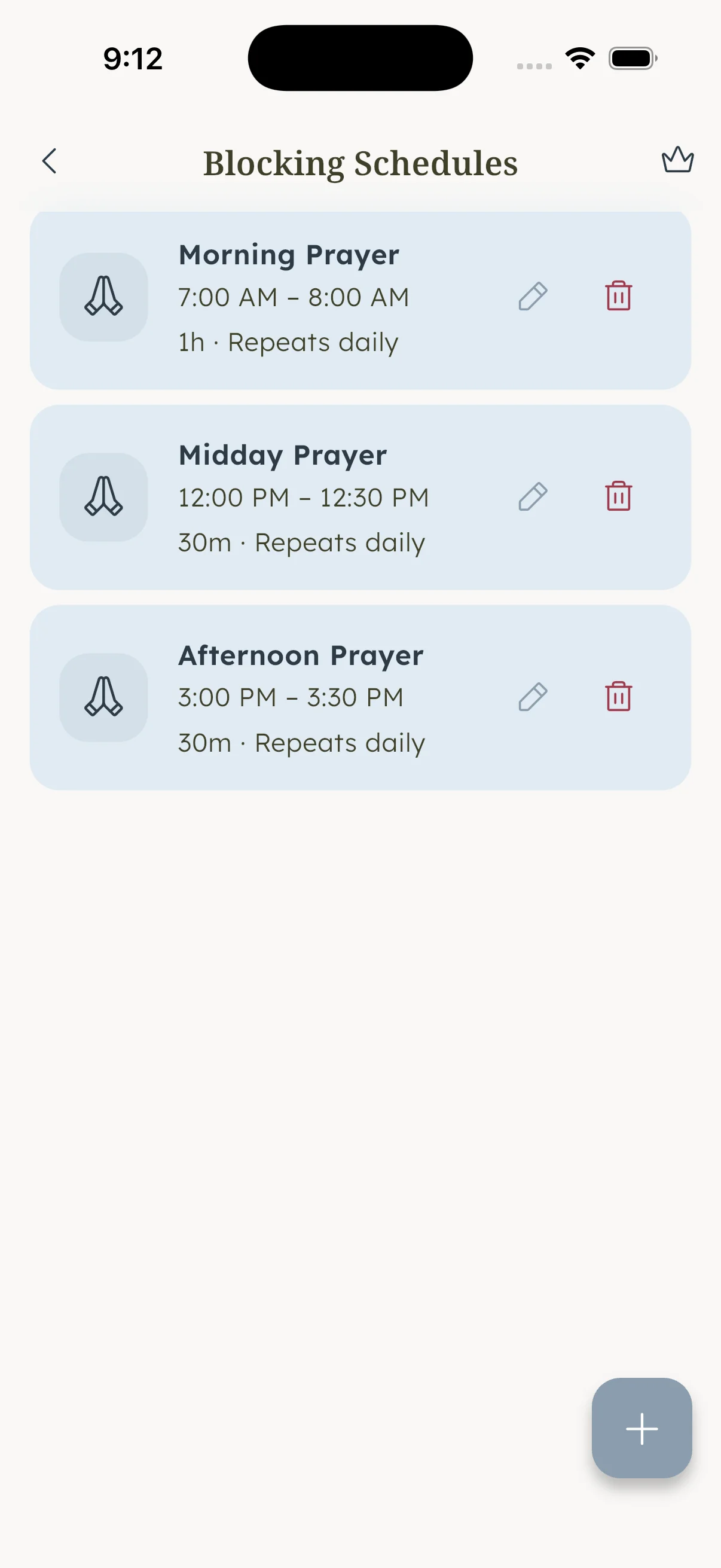
Start protected on day one
Sacred Hour ships with morning, midday, and evening prayer windows already running — so the habit starts the moment you install, not whenever you finally get around to setting it up.



Common questions
Do I have to set up a schedule before app blocking works?
No. Sacred Hour comes with three blocking windows — morning, midday, and evening — already configured, so blocking works from the first launch. You can adjust or add to them anytime, but you don't have to build anything to get protected.
Can I change the default blocking windows?
Yes. Every default is fully editable — move the times, rename the windows, or add as many custom periods as you want around your actual day. The defaults are a starting point, not a fixed setting.
What happens on a day I can't keep a window?
Pause today's active window with a single tap. Handle whatever came up, and your normal schedule resumes automatically the next day. There's nothing to remember to switch back on, so one unusual day never costs you the whole habit.
What to do now
If you've bounced off focus apps before, it was probably the setup, not you — a blank schedule is a wall most people never get over. The fix is to start from a running system instead of an empty one. Install Sacred Hour, let the three default windows do their job tomorrow morning exactly as they come, and only adjust once you've actually felt them working. The habit that survives is the one that started on day one.


